
Biometric door access: the full parts list
- Topic
- Door access and accessories
- Reading time
- 7 min
- Sources
- 2 checked
Short answer
One fingerprint or face door needs a reader outside, a secure I/O module or controller inside, an electric lock with its bracket, an exit button, separate power supplies for the reader and the lock (with battery backup), and a diode across the lock. Add a door sensor, and an emergency break-glass release on escape routes.
The parts list
Each number matches a balloon on the drawing at the top of this page.
| Item | Part | What it does | What we supply | Link |
|---|---|---|---|---|
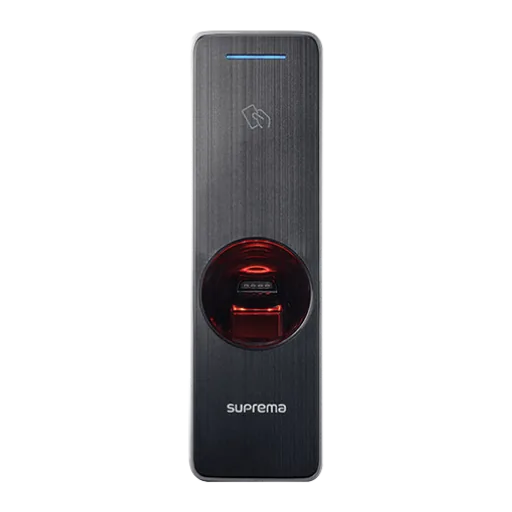
| 1 | Biometric reader | Reads a face, finger, card or phone outside the door and checks who it is. | Suprema, HuAi, Virdi, HID Amico | |
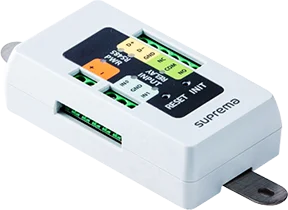
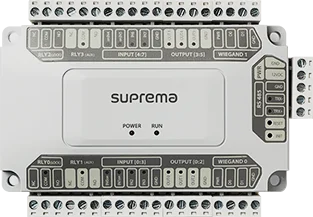
| 2 | Secure I/O module or controller | Sits inside the building and switches the lock, so nobody can open the door by tampering with the outside reader. | Suprema Secure I/O 2, DM-20, CoreStation | |
| 3 | Electric lock and bracket | Holds the door shut. Brackets fit the lock to glass or frameless doors. | EM locks, drop bolts, L and U brackets | |
| 4 | Exit button | Lets people out from inside without a card or a finger. | Push and no-touch buttons | |
| 5 | Door sensor | Tells the system when the door is open, forced or held open too long. | Door contacts | |
| 6 | Power supplies with battery | One supply for the reader side and one for the lock, with a battery for power cuts. | 12 V DC access control supplies | |
| 7 | Diode | Fitted across the lock wires, close to the lock, to protect the relay. | Fitted by the installer | |
| 8 | Emergency break-glass | Cuts power to the lock in an emergency, so the door opens. | Break-glass units |
Why the lock relay belongs inside the building
Most biometric readers have a small relay inside: a switch that can open a lock. It is tempting to wire the lock straight to the reader. Suprema's installation guide for the BioEntry W3 says not to do this where security matters. It recommends a separate relay unit, such as Suprema's Secure I/O 2, DM-20 or CoreStation, installed on the secure side of the door.
The reason is simple. The reader hangs on the outside wall. If the relay is inside the reader, someone could pull the reader off and touch two wires together to open the door. With the relay inside the building, the outside reader only says who is there; the decision and the switch stay out of reach.
The same advice makes sense for any brand. Put a controller or I/O module on the inside of every door that protects something of value.
Fail-safe or fail-secure?
This decides what the door does when the power goes off. Choose it door by door, not for the whole building.
| Question | Fail-safe | Fail-secure |
|---|---|---|
| When the power is cut | The door unlocks | The door stays locked |
| Typical lock | Electromagnetic lock (maglock) | Fail-secure electric strike or bolt |
| Relay contact in the Suprema guide | N/C (normally closed) | N/O (normally open) |
| Good for | Main entrances and escape routes, where people must always get out | Server rooms, stores and cash rooms |
| Watch out for | Needs battery backup to stay locked during a power cut | Needs a safe way out from inside, and fire approval |
Power and battery backup
Suprema's guide says to use a separate power supply for the reader and for the door lock, and to power the Secure I/O 2 separately as well. A lock draws a burst of current and makes electrical noise each time it switches. On a shared supply, that can reset the reader or the controller.
Use a power supply with a backup battery. In a power cut it keeps the readers working and keeps fail-safe doors locked until the battery runs down. Check the lock's voltage (12 V DC is common) and its current, then choose a supply with spare capacity.
Some readers can take power over the network cable (PoE, power over Ethernet). A PoE injector powers the reader, but the lock still needs its own supply. See power supplies.
What the diode is for
When an electric lock switches off, its coil kicks back a short spike of voltage in the wrong direction. Over time, this can damage the relay contacts. A diode fitted across the lock wires soaks up the spike.
Suprema says to install a diode at both sides of the door lock wire, close to the door lock. Some locks have this protection built in, and the lock's datasheet will say so. It is a tiny part that saves relays.
Lock types compared
An electromagnetic lock suits most office doors. Glass and frameless doors need the right bracket, so plan it with the lock.
| Lock | How it holds the door | Power cut | Best for |
|---|---|---|---|
| Electromagnetic lock (EM lock, maglock) | A magnet on the frame holds a steel plate on the door. Rated by holding force, for example 600 lb (about 270 kg) or 1,200 lb (about 540 kg). | Unlocks (fail-safe) | Most office doors, including glass doors with an L or U bracket |
| Electric drop bolt | A bolt drops into a hole in the frame or floor. | Usually unlocks; fail-secure models exist | Glass and frameless doors |
| Electric strike | Replaces the strike plate in the frame and releases the latch. | Fail-safe or fail-secure models | Wooden and metal doors that keep their handle and key |
Choosing the holding force
Choose a 1,200 lb lock for heavy doors and main entrances, and a 600 lb lock for most inside doors. Glass doors usually need a U bracket; inward-opening doors need a ZL bracket. Browse door locks and brackets, or send us a photo of the door and its frame and we will pick the lock and bracket.
Exit buttons and emergency release
Every controlled door needs a way out. An exit button, also called request-to-exit, opens the door from inside. Choose a push button, or a no-touch button that you wave a hand over. See all exit buttons.
On escape routes, add an emergency break-glass unit, such as a break-glass door release. It cuts power to the lock directly, so the door opens even if the controller fails.
Your building's fire safety approval decides which doors must unlock when the fire alarm sounds. A fire alarm input on the lock power supply or the controller handles that. Ask your fire consultant or building management before you install.
Example door kits
These are starting points. We size each kit to the door, the wall and the way people use it.
| Door | Reader | Inside | Lock | Extras |
|---|---|---|---|---|
| Office glass door, attendance and access | Face terminal, for example Suprema BioStation 3 or HID Amico | Secure I/O module | 600 lb EM lock with U bracket | No-touch exit button, break-glass, 12 V supply with battery |
| Server room | Fingerprint and card reader, for example Suprema BioEntry W2 | Secure I/O module or controller | Fail-secure electric strike | Door sensor, exit button, supply with battery |
| Outdoor gate or site entrance | Outdoor-rated face or fingerprint reader, such as Suprema BioEntry W3 or BioEntry W2 | Controller in an indoor cabinet | A lock suited to the gate | Shade over the reader, supply with battery |
Build your kit
Add the reader and the accessories below to your quote list, or send us a photo of the door on WhatsApp and we will build the kit for you. Not sure which reader? Read face or fingerprint attendance first, and MIFARE or proximity cards if staff will also use cards.
Products in this guide
Add what you need to one quote list, then send it by WhatsApp or email. We reply with prices and stock.
Sources we checked
Product facts come from the makers' own pages. Rules come from official or legal sources.
- 1Suprema BioEntry W3 installation guidedocs.supremainc.com
- 2Suprema security products lineup (controllers and I/O modules)supremainc.com
Questions buyers ask
Short, plain answers. If yours is not here, ask us on WhatsApp.
Do I need a separate power supply for the lock?
Yes. Suprema's installation guide says to use separate power supplies for the reader and the door lock. A lock draws a burst of current and makes electrical noise when it switches, which can reset a reader on a shared supply.
What is the diode for?
It protects the relay. When an electric lock switches off, its coil sends back a short reverse voltage spike. A diode fitted across the lock wires, close to the lock, absorbs it. Some locks have the protection built in.
Should I choose a fail-safe or fail-secure lock?
Fail-safe unlocks when the power is cut, so it suits main entrances and escape routes. Fail-secure stays locked, so it suits server rooms and stores. Your fire safety approval decides which doors must release on a fire alarm.
Can the reader open the door by itself?
Many readers have a built-in relay and can drive a lock directly. Suprema advises against this where security matters, because the relay sits on the outside wall. Put a secure I/O module or controller on the inside instead.
Do I need a door sensor?
It is optional but useful. A door sensor tells the system when a door is forced or held open, so you can raise an alarm or send an alert. It also makes door reports more accurate.
Read next
Send us your list. We reply with prices and availability.
Not sure which one fits? Send us a photo of the site, the door or the card you use now. We suggest the parts, then supply, install and support them across the UAE.
- Company
- LogIT Solutions LLC
- Office
- Dubai Silicon Oasis
- In business
- 13+ years
- Phone
- +971 50 889 5653
- Offices
- UAE · India · Kenya